Concept design
Plus
Healthcare booking dashboard app
rotatoFlintoSketchmiro

The goal of this project was to design a dashboard app that provides a booking system for healthcare professionals (GP, Practitioner, Dentist and related fields) enabling them to organise daily bookings, generate invoices, share files between members and provide an email client.

The problem
The problem was focusing on what the dashboard app should do, and what would be beneficial for the organization to manage their entire patient bookings within the app.

Benefits: Fast and clear view of all bookings, easy to use, and extra internal management options for the organization.

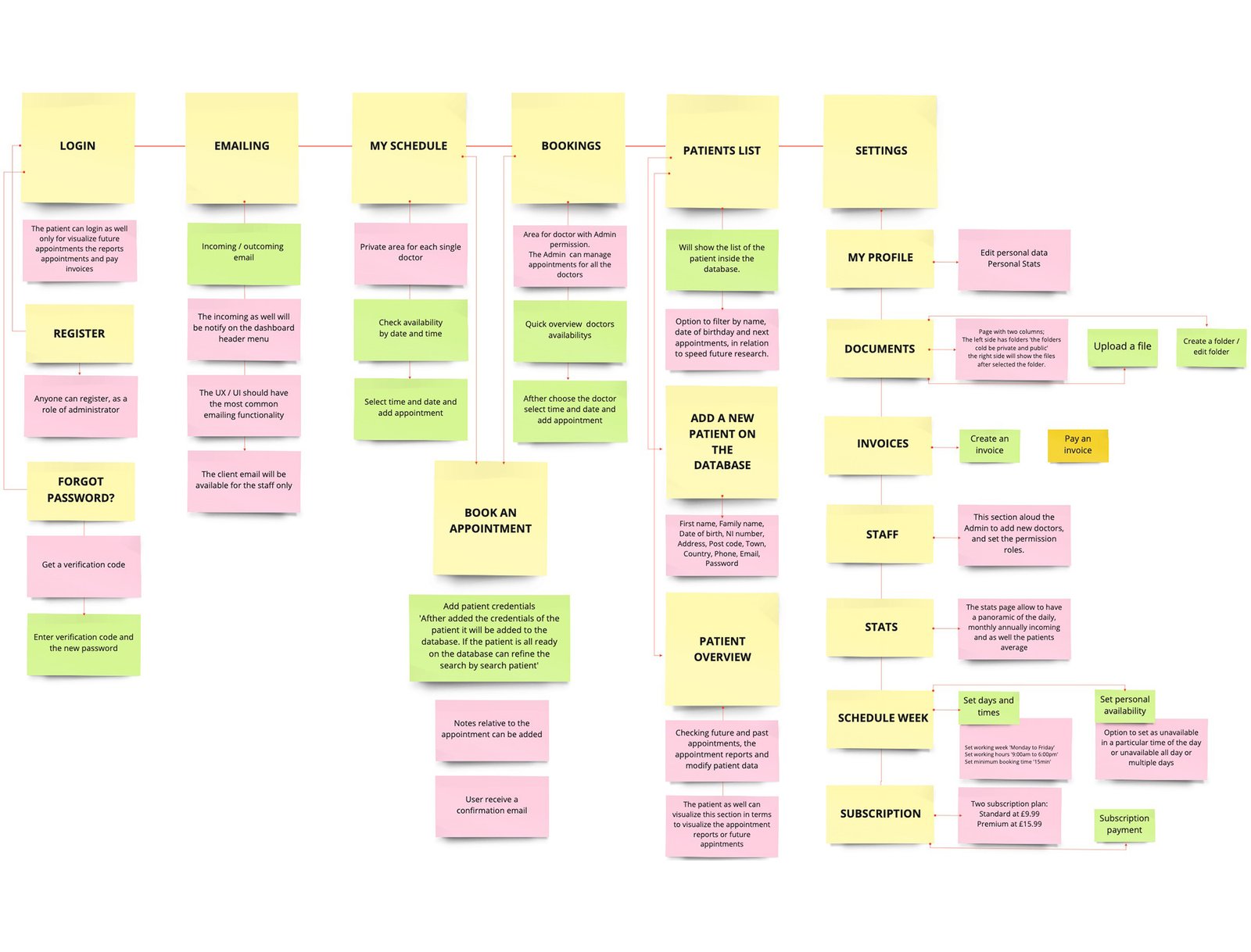
How did I solve the problem? I started to design site map which helped me to evaluate my ideas and as well defining what the app will do and the key points to cover.
miro

Challenges and solutions

1st challenge
For the booking section the challenges were; structural: how to simplify the design, giving to the user a quick and clear vision of the daily availability and a fast booking; and functional: how to simplify the steps the users will do during the booking process.

Solutions.

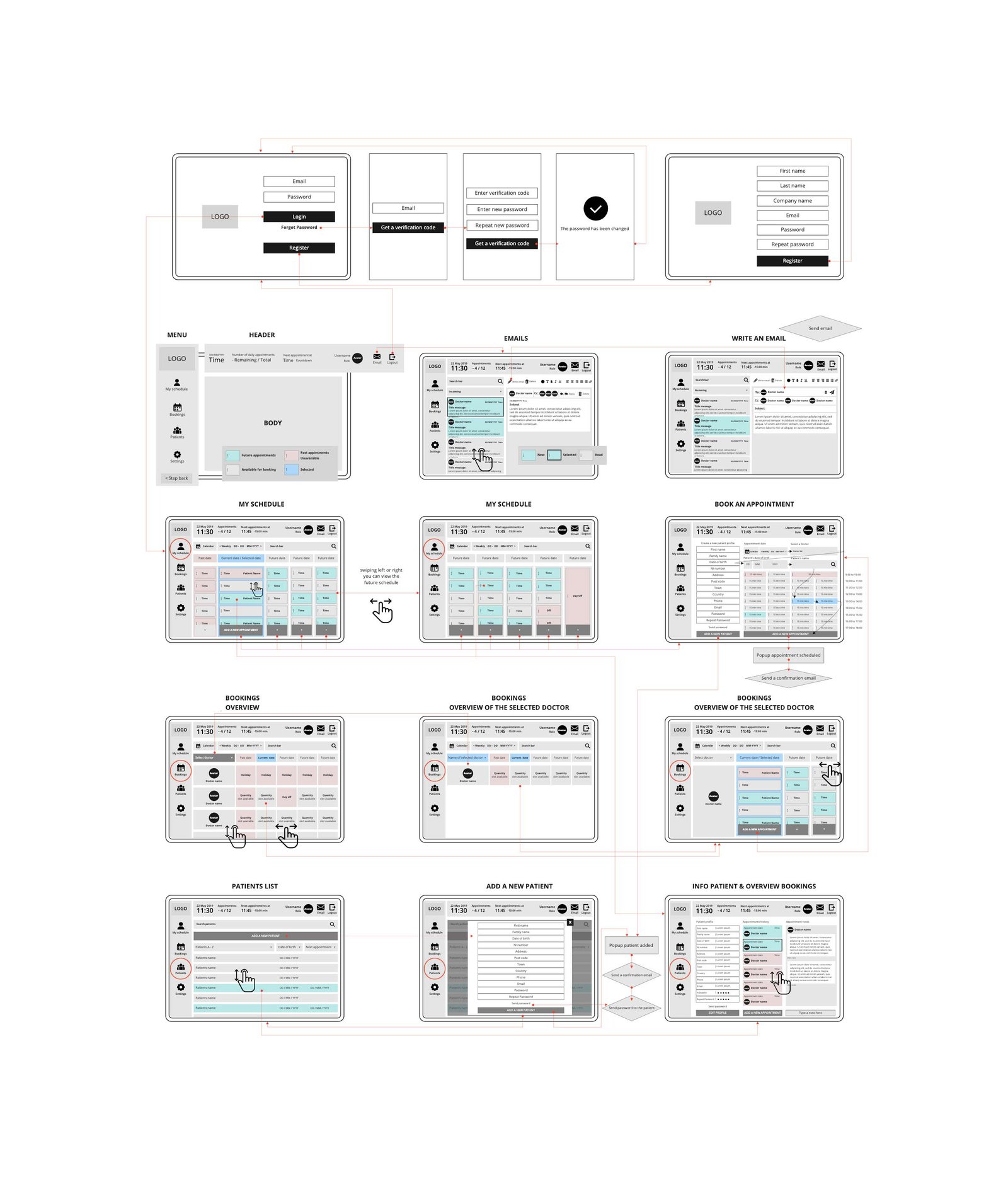
I started to design a wireframe to help me to develop a structural vision and identity.
Structurally - I created a table for the doctors where each row corresponds with a doctor and in each cell the daily availability is displayed.
Functionally - Clicking inside the daily cell/slot redirects to the relative doctor's page with the daily bookings. Here, it is possible to see the timetable which includes past and future appointments, free space to allocate new appointments, and the option within the cell to select the time and book the appointment.

To simplify and speed-up site management, I also allocated three core sections in the menu on the left-hand side: My schedule, Bookings and Patients.
  • My schedule is a private area dedicated to the healthcare professional, which allows them to manage their own appointments. This section has a calendar structure where the user visualizes their daily bookings and can add new appointments. By default, I decided to dedicate a fifteen-minute time slot for each appointment, but that also can be incremented progressively in the reservation section, or the default slot time can be customized in settings.
  • Bookings allow only the administrator or those with admin permissions to have a quick view of all the bookings and manage the bookings for all the employees.
  • Patients: this section allows users to register new patients in the database, and keeps a record of past and future appointments. This is also integrated with an area where it is possible to add a report for each appointment.
miro
UI Prototype

My schedule, Bookings sections and Email Client

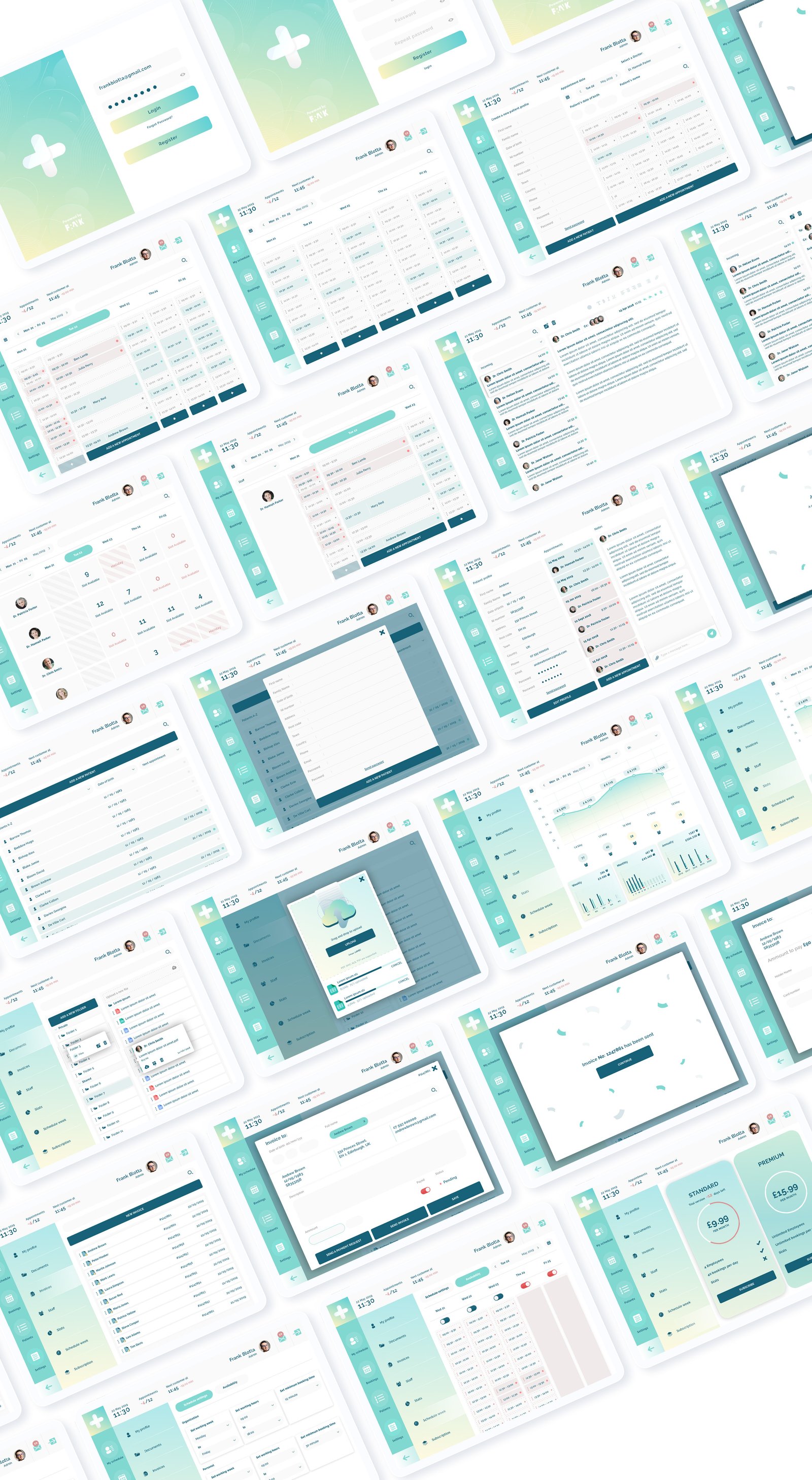
In the prototype it is possible see how simple and intuitive it is to add a new reservation following these steps: check availability, add a new appointment, add patient info, select time, add the new patient and 'book now'.

It is also possible to see the patient list, which has a customer database to visualize the previous appointments with the option to add a clinical record for each appointment.

I decided to integrate an email client into the dashboard that allows the member to have the dashboard in the foreground. This avoids the user having to leave the dashboard to read emails in a different email client. The email client was designed with a simple and minimal user interface, and the most common functionality to keep it easy to use.
SketchFlintorotato

Challenges and solutions

2nd challenge
The challenge wasn't just how the bookings section will work but also how to allow the members of the organization to manage the bookings settings and add extra services that are beneficial to the management of the entire organization

The solution was to add the following extra settings:
  • My profile - modify personal settings.
  • Documents - create folders and upload files to share with other organization members.
  • Invoices - create invoices and maintain an invoice history.
  • Staff - admin can add new members to the organization.
  • Stats - up-to-date daily, monthly and annual statistical report of income profits and number of customers.
  • Weekly Schedule - manage the booking time options and the daily availability of individual members.
  • Subscription - the dashboard is a trial version and has two different plans.
miro
UI Prototype

Settings

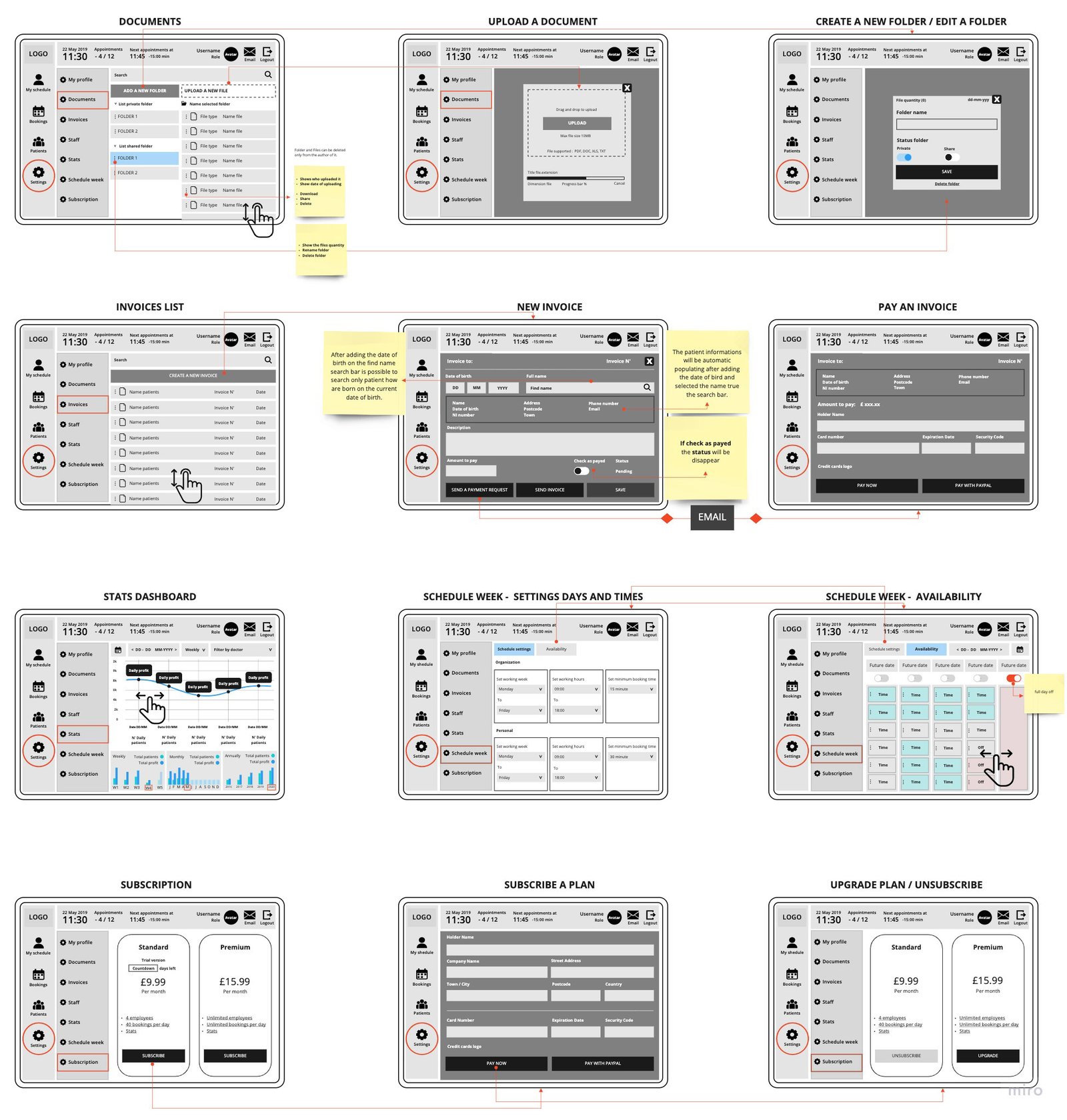
In the prototype it is possible to see that most of the components were created on the UI Kit as toggle buttons, input fields, and widgets are predominant in the settings and enabled me to simplify the users ability to manage the settings. Smooth transitions and popups were integrated to increase user interest and engagement.
SketchFlintorotato
UI Kit
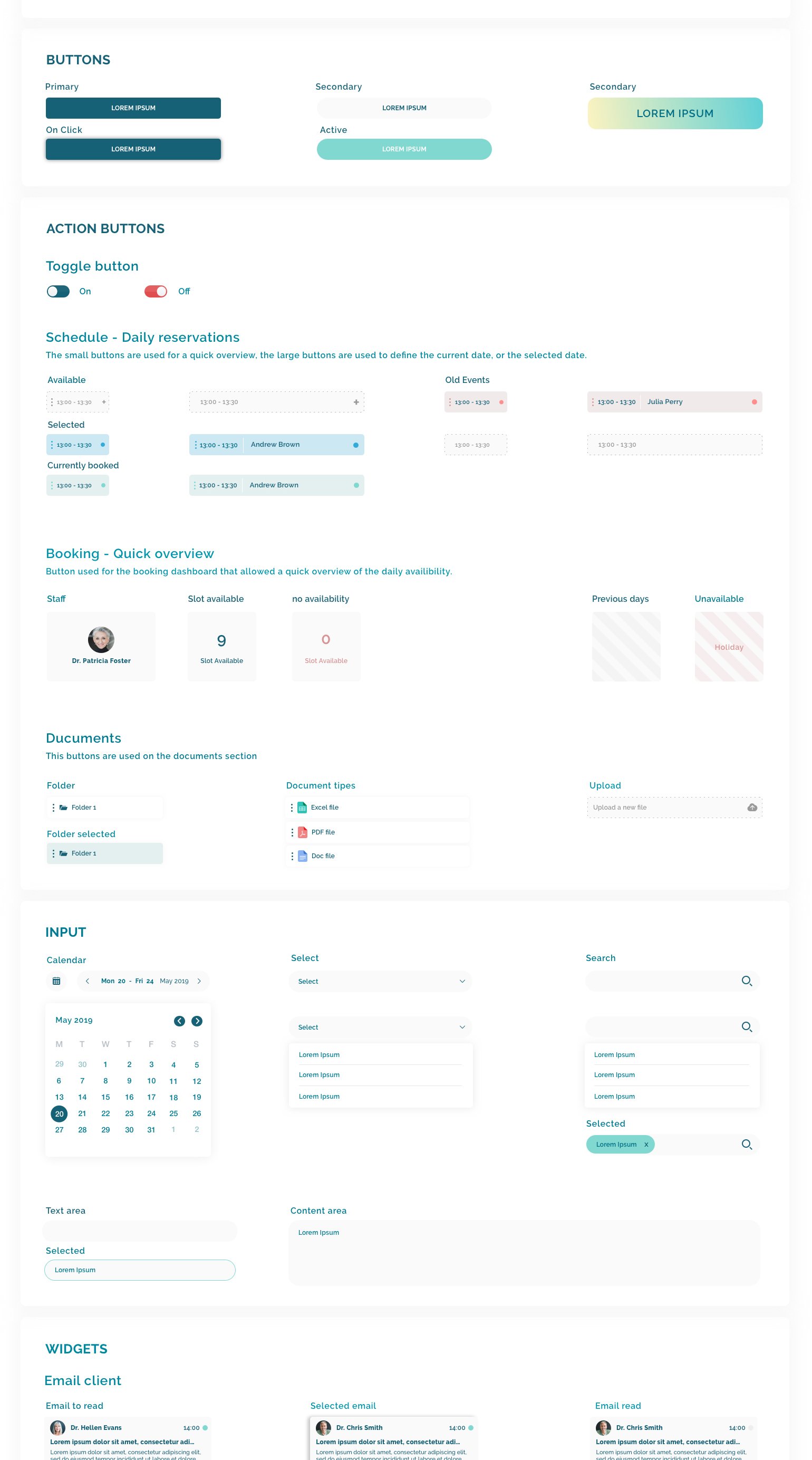
I designed all the main elements that could be easilly integrated inside the dashboard. I also defined fonts size, pallet colour, and icons. To give a sense of heltcare and profesionality I used light colours and a clean and simple style to design the UI elements.
Sketch

Outcome and takeaways


  • User Engagement: Applying a drag and scroll inside the entire app helped to simply the overview and the structure of the booking system. It also increased the engagement with the user because it creates interactivity between the dashboard and the user.
  • Balance between aesthetics and functionality: The table structure was designed not just to be aesthetically appealing but with development in mind as the data can be easily allocated through the database using array.
  • Extra-curricula work: Designing this app during my free-time meant that, I could be more creative, experimental and play with new design solutions. This knowledge can then be used in future projects.